
Meta XR Hub 3D Gate UI
Designed an XR interaction concept that helps users understand movement rules and spatial transitions before entering virtual environments, reducing confusion and cognitive load.
Type
Team Project
Tools
Blender, Unity, Illustrator, Sketchup
Timeframe
Oct 2022 - Dec 2023
Role
Interaction Designer
Problem
Entering VR often feels like stepping into an unfamiliar world without any preview of how movement, gravity, or interaction will behave.

Cognitive overload at entry
Abrupt, opaque transitions from the home menu to VR spaces create uncertainty, causing cognitive overload and motion sickness, which leads to churn.

No pre-entry cues on the home screen
Before launch, users can’t tell the locomotion/control scheme (self-directed vs. forced) or the degree of physics coherence (reality-aligned vs. divergent), slowing adaptation and raising anxiety.
Solution
Meet Meta XR Hub
A spatial interface that previews how a virtual world will move, feel, and behave before users step inside.

Primary Research
Turning to my own cohort to understand how people experience others beyond the field of view in social VR
According to prior research, VR environments differ from the real world in terms of physical laws such as Gravity, Scale, Object, Time, and Environment. To help users adapt to these changes as they enter VR app spaces, we explored ways in which interactions could occur on the VR home screen, where real-world physical laws still apply. Then, we decided to dive more into Gravity and categorized based on two criteria: the user’s movement and the movement of objects.
To analyze the laws of gravity in more detail, we examined VR apps where gravity operates differently from reality. This resulted in a matrix that crosses four categories of movement also with three levels of physical reaction:
-
no movement from home, movement not possible with controller, movement with the controller, and forced movement beyond input
-
point-and-click only, reactions similar to reality, and reactions different from reality.

By mapping concrete examples into this structure, such as native apps, standing simulation games, military FPS, roller coaster simulations, and fantasy FPS, we were able to systematically classify VR experiences according to how their mechanics diverge from or adhere to real-world physical laws.
Ideation
Exploring how pre-entry interfaces could preview a world
I explored several ways a home environment could begin to communicate app-specific world rules before launch with Blender and Unity. Early directions included turning the menu into a 3D interface and using representative objects and motion behaviors from a selected app to hint at how its environment would feel. These studies helped move the project away from flat icons and toward a transition system that could preview interaction rules in space.


Design Goals
1. Preview locomotion
before entry
Help users anticipate whether movement will feel body-synced, controller-based, or independent before they cross into the app.
2. Reduce Cognitive load through continuity
Replace abrupt jumps with a transition that gradually reveals the new world’s rules and reduces uncertainty during entry.
3. Make world logic legible through interaction
Use motion, form, and spatial response to communicate how a world behaves, not just what app it is.
User Flow
Placing the VR user in a pre-entry scenario reveals the actions the system needs to support
A user browsing the VR home environment should be able to sense how an experience will move before committing to it. By previewing locomotion and physical behavior in advance, the system supports faster orientation, better expectation setting, and a smoother emotional transition into immersive content.

System Structure
A gate system designed to preview world behavior before entry
What is "Gate?"

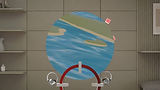
The Gate proposed as a UI element replacing the traditional icon is composed of an actor, reactor, and base. Instead of clicking an icon and jumping instantly into a world, users hover, preview, and then cross through an interface that already begins to express how that world will move and respond.

How does it work?
When selected in the Hover stage, the portal is activated, and within that "threshold space," users can gradually anticipate the rules of "actions" and "movements" of the body that will change within the content. Then, when the user grabs the "actor" in the activated portal stage, the spatial transition occurs.

To integrate the gate, icons were redesigned to align their interfaces with the new interaction model, adopting an actor–reactor–base structure that makes the dynamics of action, reaction, and contextual background immediately clear to users.

Hover Preview
In the Hover stage, the interaction changes depending on the color code that we categorized in advance.
-
Color code Green: Base shifts to green
-
Color code Yellow: Base shifts to yellow
-
Color code Red: Base shifts to red
-
Color code Blue: Actor and Reactor slightly move forward
-
Color code Purple: Actor and Reactor animate to reflect the app’s internal movement
Through these combinations, users can experience a total of six distinct hover effects.

Open Portal
In the green-coded scenario, the user physically approaches the portal, entering the app space as the portal expands forward.
In the yellow-coded scenario, the portal itself moves toward the user, smoothly enveloping them and guiding the transition.
In the red-coded scenario, the portal defies gravity and ascends dynamically toward the user, creating a more vivid and energetic entry.

Enter App
Across these variations, particles become more active and dispersed around the portal as the color transitions from green to red, visually emphasizing the increasing intensity and liveliness of the movement.
Final Outcome
Six gateways translate different movement logics into legible entry cues
The final system organizes VR content through six gateway behaviors based on differences in body or avatar movement and action logic. Reality-like experiences are distinguished from more surreal ones, and each hover or transition behavior is tuned to help users anticipate how the app will feel before entering it.


Takeaways
Meta XR Hub reframes the moment before entry as a design opportunity, not just a technical transition.
This project turned VR launch into a spatial onboarding problem and proposed a gate-based system that helps users preview locomotion and physical behavior before entry. By focusing on continuity rather than instant switching, it offers a way to reduce uncertainty at one of the most fragile moments in immersive interaction.
As VR experiences become more varied in how they move and behave, users need better ways to form expectations before entering them. Making world rules legible in advance can improve comfort, reduce cognitive load, and support more intuitive adaptation in immersive systems.
Future work could test the gateway system with users across different types of VR apps and refine how much preview is enough before it becomes distracting. The concept could also expand beyond gravity to communicate additional world rules such as scale, time, and environmental behavior.
Achievements
Patent
The hyperlink visualization system that alleviates the user's perceptual burden due to the difference in movement rules between virtual spaces and the method thereof
Jung, E., Kim, M., Kwon, J., Jeung, B., Lim,S. 2024.
Korean Patent 1020240075067.