
Samsung Galaxy Nexy Button
Developed a next generation device interaction concept that connects AI features with physical controls, making new forms of everyday interaction feel more natural and intuitive.
Type
Team Project(Industry-Academic Collaboration)
Tools
Figma, Illustrator, Photoshop, Fusion 360, Keyshot
Timeframe
Mar - Jun 2024
Role
Interaction Designer
Problem
AI on smartphones is growing quickly, but the way people access and understand it still feels fragmented and unclear.
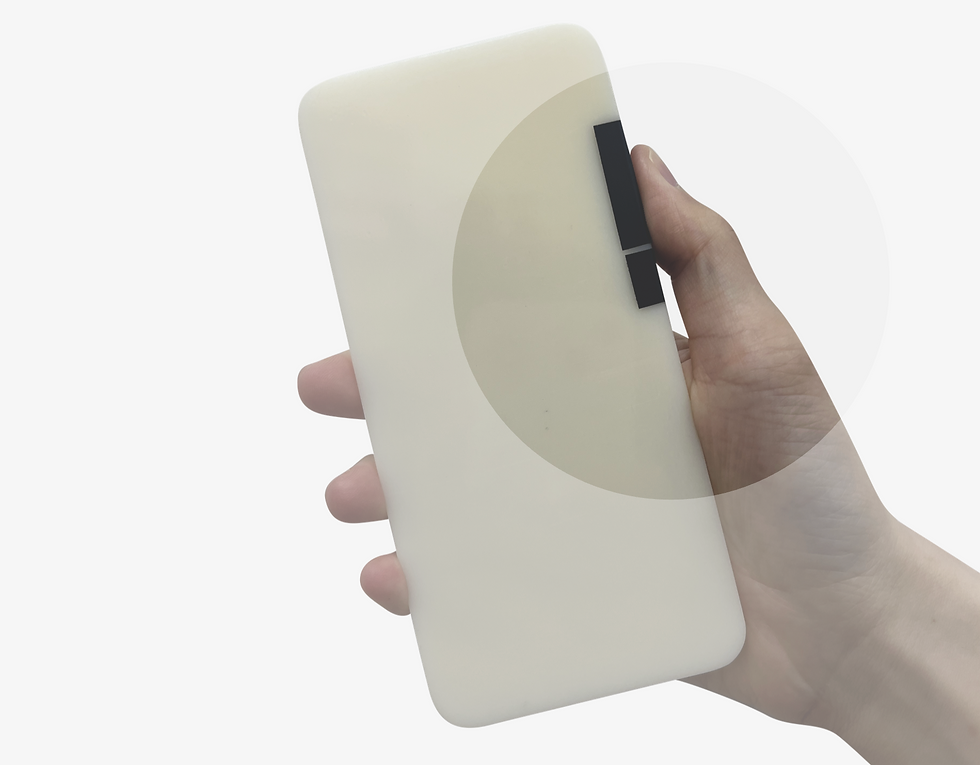
The need for a body design that responds to touch intent
Unlike earlier concept designs that only reacted mechanically, there is a need for the device body to evolve into a design perspective that responds to human touch context and intention.

A touch button-centered UI/UX design that recognizes user behavior and habits
Along with enabling on-device AI functions through the touch body, the interaction of the touch button should recognize user behaviors and habits, forming a UX feedback loop that requires thoughtful design.
Solution
Meet a more legible AI device experience
A concept that combines touch-based physical controls with a unified AI invocation system, helping users access, understand, and gradually adopt AI features in everyday use. The final proposal connects PUI exploration, unified assist entry, and context aware recommendations into one device experience.

Primary Research
Looking at how people actually use smartphones helped define where AI should feel physically accessible
We studied everyday smartphone behavior to understand how a new AI control could fit real usage patterns. We found that 49 percent of users operate their phone with one hand, 36 percent cradle the phone with one hand and interact with the other, and only 15 percent consistently use both hands. Combined with unreachable zone analysis and hand dimension data, this showed that new controls should support one handed use, reduce strain, and remain easy to locate without visual attention. These findings pointed to the device edge as a promising place for more intuitive AI interaction.
Looking at the current Galaxy AI ecosystem revealed why users need a clearer way to invoke and understand AI
I also reviewed how Galaxy AI currently appears across the system. Features such as Browsing Assist, Writing Assist, Photo Assist, Call Assist, Note Assist, Record Assist, Interpreter, and Circle to Search were already useful, but they were introduced through inconsistent menus, visual styles, and interaction flows. This fragmentation reduced predictability and weakened trust, suggesting the need for a more unified invocation structure and a more consistent experience across assistive features.
Understanding the relationship between Bixby and Galaxy AI revealed an opportunity for integration
I examined how Galaxy Bixby and Galaxy AI function within the Samsung ecosystem and found that the two systems play complementary roles. Bixby supports function execution, contextual awareness, and voice interaction, while Galaxy AI expands creative and assistive capabilities such as editing, summarization, translation, and search. This suggested an opportunity to unify both assistants through a shared call function rather than treating them as separate systems.
Fragmentation in the Galaxy AI ecosystem weakens coherence and predictability
Galaxy AI currently offers a wide range of assistive features, including Browsing Assist, Writing Assist, Photo Assist, Call Assist, Note Assist, Record Assist, Interpreter, and Circle to Search. While each feature supports specific user needs, they exist in fragmented forms with inconsistent context menus, visual styles, interaction flows, and terminology.
These inconsistencies disrupt the overall look and feel of the ecosystem, leading to user confusion and reduced predictability. This revealed the need for a unified AI framework that could standardize UI and UX principles across assistive features and create a more seamless and reliable experience.
Design Goals
1. Make AI access physically intuitive
Use touch-based controls that support natural one-handed use and reduce friction in everyday interaction.
2. Create one unified entry to AI
Replace scattered assist entry points with a clearer invocation structure that feels consistent across features.
3. Support gradual adoption
Design the system so users can move from awareness to regular use through context-aware guidance, dedicated controls, and eventual in-app integration.
User Scenario
How AI should appear in everyday smartphone use
This project imagines AI not as a feature users must go looking for, but as something that appears at the right moment and becomes easier to access over time. A user may first encounter AI through a contextual prompt while using the phone, then begin invoking it more deliberately through a dedicated control, and eventually use it as part of a seamless in app routine. The scenario frames AI adoption as a gradual shift from awareness to familiarity to everyday reliance.
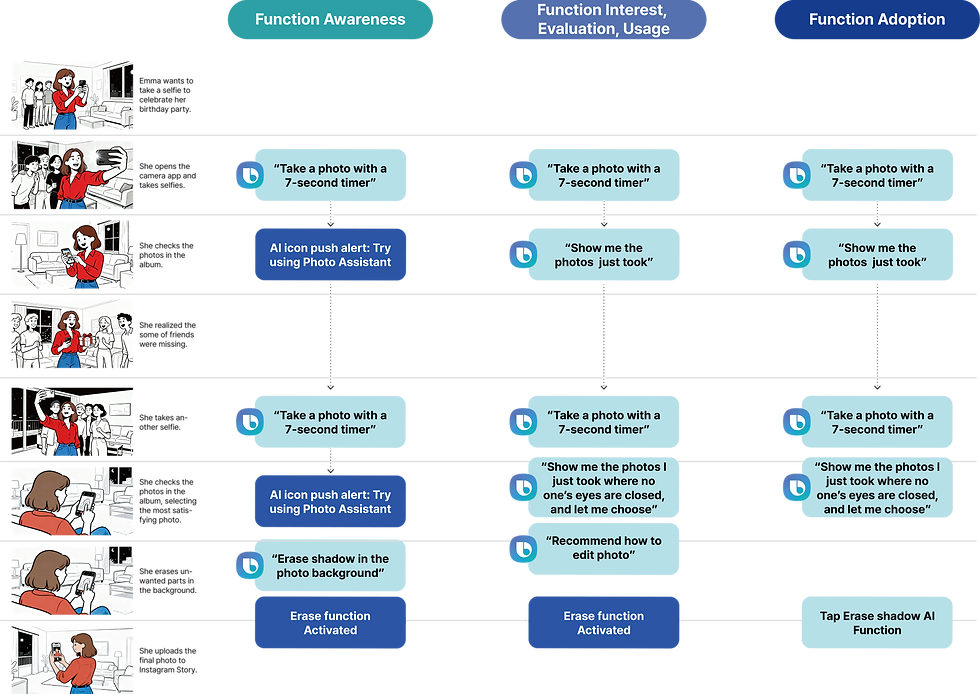
User Flow
How users move from discovering AI to integrating it into routine tasks
The user flow is based on Rogers’ Diffusion of Innovation model. In the early stage, users encounter lightweight prompts and contextual suggestions. In the middle stage, a dedicated button supports more deliberate and reliable access. In the final stage, AI features become embedded directly inside apps, allowing users to invoke them as part of normal use rather than as a separate system.

Usability Testing
Testing how touch based controls could make AI feel more accessible
To explore how AI access could become more intuitive, we ran a PUI workshop with 8 participants comparing the Galaxy S24 side buttons with new touchpad based layouts. The study tested button position, pad length, and gesture types to understand which configurations felt most natural in everyday use. Overall, the redesigned PUI improved usability by 42.6 percent, raising average scores from 4.7 to 6.7 out of 8.

What the testing revealed!
Touch reduced strain but needed stronger feedback
Participants found touchpads quicker and less physically demanding than mechanical buttons, especially for repeated actions such as volume control, screenshots, and camera use. At the same time, they struggled with positional awareness and wanted clearer feedback to confirm input.
Gesture comfort depended on placement
The right side worked best for swipe based gestures, while the left side was better for simpler actions such as tap and press. This showed that gesture type and button function should be assigned according to how each side of the hand naturally moves.
Wireframing
Integration of Bixby and AI Assistant
After defining the physical interaction logic, I mapped how users would discover, invoke, and repeatedly use AI across different moments of smartphone use. The wireframes focused on connecting the dedicated AI entry point to a broader interaction system, showing how physical access, contextual recommendations, and in app integration could work together as one experience.

Final Outcome
Exploring two physical directions for making AI more legible on the device
Based on the PUI testing, the final physical output developed along two complementary directions. One direction preserved familiarity while improving fluidity through touch based controls. The other made AI physically explicit by introducing a dedicated AI key. Together, these concepts explored how the device body itself could help users recognize, access, and trust AI more naturally.
SLICK FLOW
Slick Flow explores how replacing the physical volume buttons with a touchpad can create a smoother and more intuitive interaction while maintaining the familiar button layout of the Galaxy S24.

TAP!
GALAXY AI IS HERE
Tap! Galaxy AI is here is proposed to add an AI key that can actively call the AI assistant. This AI key ensures that the AI button is always accessible and consistently executes AI functions.



Unifying Bixby and Galaxy AI through a shared point of access
To leverage the shared call function, we explored the integration of Galaxy Bixby and the Galaxy AI assistant. We designed a Physical User Interface button that allows users to seamlessly summon both assistants at once.
In this project, I was responsible for designing the overall UX framework to create a smooth and consistent user journey across the integrated system. I also contributed to the UI design by aligning visual identity and interaction patterns to support a more cohesive experience.
This integration clarified the complementary roles of the two systems. Bixby supports function execution, contextual awareness, and voice interaction, while Galaxy AI expands creative and assistive capabilities such as photo editing, summarization, translation, and search. Together, they form a more powerful, unified, and intuitive assistant experience.


Takeaways
This project reframed AI on a smartphone as both a physical interaction problem and an adoption problem.
The final concept proposed a more legible relationship between hardware and AI by combining touch-based controls, a dedicated AI entry point, unified assist menus, and an adoption-aware user flow. Rather than treating AI as a set of scattered features, the project organized it into a more coherent device experience.
As AI becomes part of everyday devices, users need more than capability. They need clear access points, predictable behavior, and guidance that fits their familiarity level. This project suggests that trust in AI can be shaped not only through software, but also through physical interaction design.
Future iterations could test the unified AI invocation structure with users over longer periods and explore how physical controls, haptic feedback, and context-aware UI together influence habit formation and trust.