InBetween
Designed a video-conferencing interface that makes pre-speech intention visible, helping online groups recognize when someone is about to speak before the turn is fully taken
Type
Solo Project
Tools
Figma, JavaScript, LiveKit, MediaPipe, WebRTC
Timeframe
Feb - May 2026
Role
Interaction Designer
Problem
Online meetings show who is speaking, but not who is about to speak

Invisible pre-speech intention in online meetings
In face-to-face conversations, people rely on subtle bodily cues to understand when someone is preparing to speak. In online meetings, these signals are flattened into a grid. As a result, participants often cannot tell who is about to speak until the person has already started talking.

Awkward silence becomes a frozen grid
In physical conversations, silence is still socially active. In video calls, however, silence often appears as a static grid. When no speaker is detected, the interface simply turns to a neutral layout where every participant looks equally inactive. This makes silence feel awkward, empty, and unresolved.
Solution
Presenting InBetween
InBetween is a video-conferencing interface that visualizes the moment between listening and speaking.
Primary Research
Interviews revealed that difficulty in online turn-taking happens before speaking and during silence
To ground the project in real user needs, I conducted semi-structured interviews with 12 frequent video-call users, including undergraduate and graduate students and team collaborators who regularly participate in online classes, critiques, and meetings. The interviews focused on moments when participants wanted to speak, hesitated to enter, or experienced awkward silence in group conversations. The findings pointed to a clear opportunity: current video-call interfaces support who is speaking, but do not support the transition into speech or the shared pause when no one speaks. Participants wanted more legible cues for readiness, hesitation, and conversational opening without relying only on explicit actions like raising a hand.
“In person, I can usually tell when someone is about to speak, but online everyone looks the same until someone suddenly starts talking.”
58%
said they often hesitated to speak because they could not tell whether someone else was also about to enter the conversation.
83%
said active speaker indicators were helpful only after speech began, but did not support the moment before speaking.
91%
described silence in online meetings as awkward because the interface gave no visible cue about who might speak next.
Competitive Analysis
Existing platforms support participation, but not the in-between moment of turn-taking
I reviewed common video-conferencing strategies such as active speaker indicators, raise-hand systems, reactions, chat, and shared spatial layouts.
These features support visibility or participation in different ways, but most of them either respond after speech begins or require users to make an explicit action. They do not represent the subtle transition from listening to preparing to speak.

Through this analysis, I found that existing platforms leave a gap between passive listening and active speaking. Active speaker indicators are useful, but they only appear after someone has already started talking. Raise-hand systems clarify turn order, but they feel too formal for subtle conversational timing. Reactions and chat allow lightweight participation, but they often become alternatives to speech rather than bridges into spoken entry. Shared spatial layouts support co-presence, but they remain static when users hesitate, prepare, or wait in silence. This gap became the foundation of InBetween: designing visible interface states for the moments before and between speech.
Design Goals
1. Make
pre-speech
intention visible
Translate subtle cues such as lip parting, gaze direction, and leaning forward into visible tile movements before a participant fully begins speaking.
2. Support smoother
turn transitions
Help participants anticipate who may enter next, reducing hesitation, overlap, and the social risk of interrupting.
3. Reframe
silence as an active group state
Instead of leaving awkward silence as a static grid, create a visual mode that shows the group is collectively waiting, resetting, or opening space for the next turn.
4. Preserve
the familiarity
of video calls
Keep the recognizable structure of the video-call grid while adding spatial behavior that makes conversational states easier to read.
Persona
Designing for online participants who want to speak, but struggle to enter

Mina Kim is a 30 years old graduate student who often joins online critiques, seminars, and team meetings. She usually has thoughts to share, but in group video calls, she hesitates because she cannot tell when others are about to speak. She does not want to interrupt, but waiting too long often makes her lose the timing. In a physical room, she can read subtle cues from others’ posture, gaze, and facial movements. Online, however, everyone appears visually equal until someone suddenly starts speaking. She wants the interface to help her understand the group’s conversational rhythm without relying solely on audio or formal signals like raising a hand.
“I don’t always want to raise my hand. Sometimes I just want others to know that I’m about to say something.”
Frustrations / Pain Points
-
Hard to know when another participant is about to speak
-
Hesitates because interrupting feels socially risky
-
Active speaker highlights appear too late
-
Silence feels awkward because no one knows who should go next
User Flow
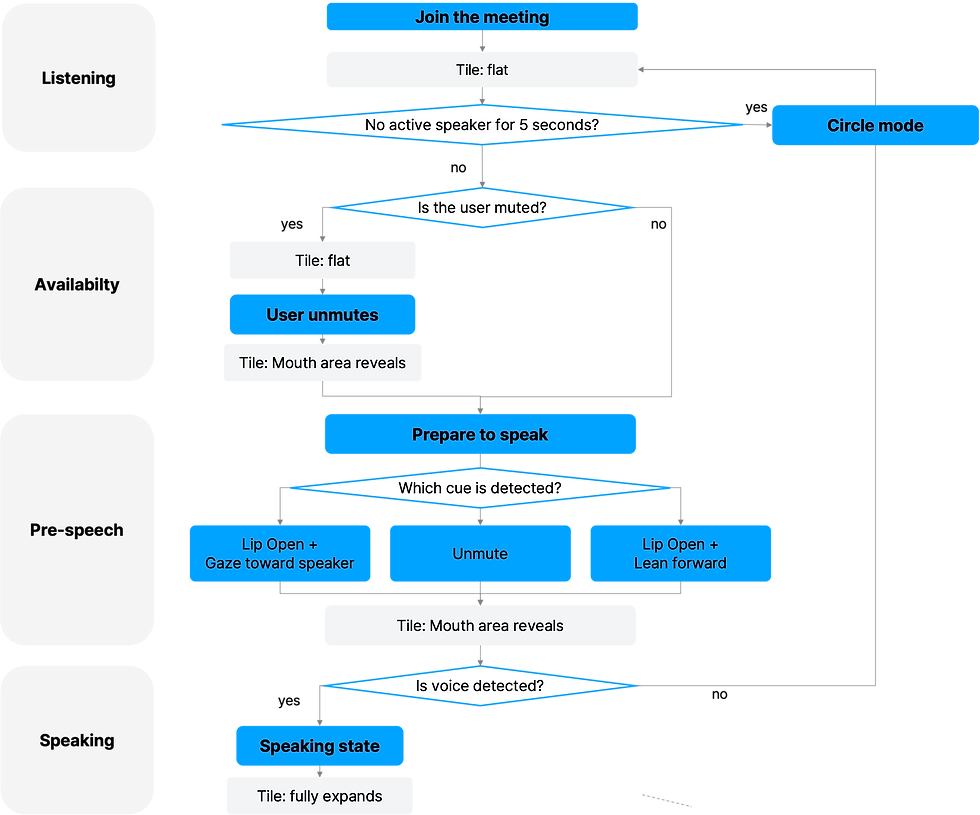
The interface follows the participant’s transition from listening to preparing to speaking
A user joins an online group meeting. At first, all participant tiles stay slightly flat, creating a neutral listening state. When a participant unmutes, their tile opens slightly from the center, signaling that they are now ready to speak. If the participant parts their lips while looking toward the current speaker, the same center-reveal appears as a soft entry signal. If they part their lips while leaning forward, the reveal becomes a stronger turn-claiming signal. Once speech is detected, the tile fully expands into the active speaker state. If no one speaks for several seconds, the interface shifts into Circle Mode, where the group rearranges into a shared pause state instead of remaining frozen in a static grid.
Prototypings & User Testings
Prototype 01: AI Conversation Prototype
Testing whether conversational presence could be represented through abstract states
The first prototype used the ChatGPT API to simulate AI participants in a conversational environment. The prototype mapped conversational states such as muted, unmuted, and speaking into changes in shape radius, width, and height. This helped me test the early idea that an interface could show not only who is speaking, but also how present or ready each participant feels.

User testing feedback
I conducted a guerrilla usability test with 13 participants. It was tested to see whether presence could be visualized before building a real video interface.
What Worked!
Participants understood that the interface was trying to show more than binary speaking status.
What did not Worked
Talking with AI participants felt unnatural, making it difficult to evaluate the interaction as a real social experience.
What needed to change
The visual states were too simple. Relying only on radius, width, and height made the signals feel abstract and disconnected from human intention.
I kept the idea of gradual state changes, but moved away from abstract shapes and AI-only conversation. The next prototype needed to test real users, real video, and actual bodily cues.
Prototype 02: Mouth-Triggered Live Prototype
Testing real user cues with MediaPipe and WebRTC
The second prototype moved from AI participants to real users. Using MediaPipe and WebRTC, the system detected mouth opening from live video input and translated it into a visible tile response. This version made the concept more concrete because the interface was now responding to real facial movement inside a live video-call environment. However, user testing revealed that lip opening alone was not enough to represent speaking intention. Participants sometimes opened their mouths unconsciously while listening, reacting, breathing, or preparing silently. Because the system responded to a single cue, the tile could move even when the user did not actually intend to speak.
User testing feedback
I conducted a guerrilla usability test with 13 participants. Prototype 02 tested real video input, but lip opening alone created accidental signals because the system reacted to unconscious mouth movement.
What Worked!
The interaction felt more believable when it responded to real users rather than AI participants.
What did not Worked
Mouth opening alone was too sensitive and created accidental signals.
What needed to change
Participants wanted the interface to respond only when the behavior suggested stronger intention to enter the conversation.
The final system needed to combine multiple cues instead of relying on lip opening alone. I added mute state, gaze direction, leaning forward, voice detection, and silence duration as part of the final interaction logic.
Final Outcome
InBetween turns video calls into a more legible conversational interface
Based on iterative prototyping and user testing, the final interface developed along two complementary directions. One direction refined how individual speaking intention appears through subtle tile transformations such as flattening, center reveal, and expansion. The other extended the system to support group conversation flow by introducing shared states like Circle Mode during silence. Together, these decisions explored how a familiar video call grid could help participants recognize readiness, anticipate turn taking, and enter conversations more naturally.

Solution highlights
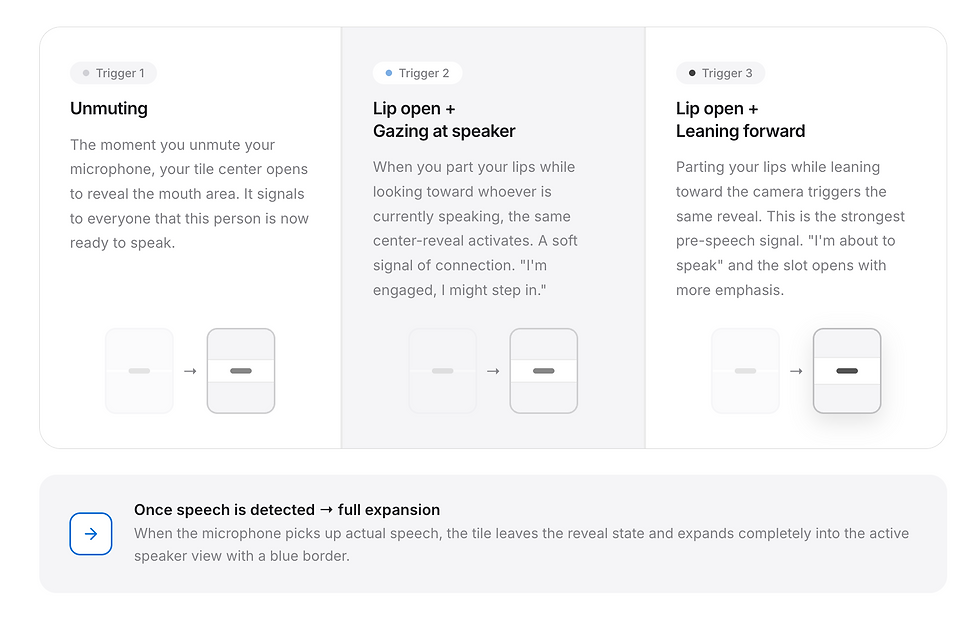
Center Reveal
The tile opens from the center just enough to reveal the mouth area, making the moment before speech visible without overwhelming the meeting interface.

Multi-Signal Triggers
Instead of reacting to mouth opening alone, the final system combines unmuting, lip parting, gaze direction, leaning forward, and voice detection. This makes the signal more intentional and reduces accidental activation.
Circle Mode
After 5 seconds of silence, the interface shifts from a static grid into a slowly rotating circle. This reframes awkward silence as an opening for the next speaker.

Final Prototype Evaluation
InBetween improved participants’ ability to recognize pre-speech intention
I tested the final prototype with 13 participants by comparing a baseline video-call grid with InBetween’s live prototype. Participants experienced both interfaces during a short group conversation task, then rated how clearly they could recognize speaking intention, enter the conversation, avoid interruption, and understand the visual cues. The results suggest that InBetween made the moment before speech more legible. Participants reported higher awareness of who was preparing to speak, more confidence entering the conversation, and reduced uncertainty during turn-taking.
“I could tell who was preparing to speak before they actually started talking, which made the conversation feel less sudden.”
100% increase
in recognizing when someone was about to speak, from 2.2 to 4.4 out of 5
95.7% increase
in awareness of others’ intention to speak, from 2.3 to 4.5 out of 5
92.3% of participants
said the tile movement helped them read pre-speech intention
84.6% of participants
said InBetween helped them enter the conversation at better timing
Try the Prototype
Experience how InBetween makes pre-speech intention visible

Takeaways
InBetween shows that online conversation needs interface states between silence and speech
Through research, competitive analysis, and iterative prototyping, InBetween reframed online turn-taking as a gradual transition rather than a binary state. The final prototype translated subtle conversational cues into spatial tile behaviors: flat listening, soft entry, stronger turn claim, active speaking, and Circle Mode for awkward silence.
As remote collaboration becomes more common, video interfaces need to support more than audio transmission and speaker detection. They need to make timing, hesitation, readiness, and silence socially readable. InBetween suggests that small spatial changes can help online groups better sense each other’s conversational presence.
Future iterations could test whether these visual cues reduce interruption, hesitation, or perceived awkwardness in real group conversations. The next step would be to refine the sensitivity of each signal, support accessibility settings, and explore how users might customize the intensity of tile movement based on meeting context.